- Brand Anatomy
- Posts
- The Collaborative Design Playbook: How Figma Scaled User Acquisition and Retention
The Collaborative Design Playbook: How Figma Scaled User Acquisition and Retention
4 mins - Bottom-up adoption: Free access for individuals, viral team invites, and community-driven growth

Pumulo Ngoma
July 14, 2025
How Figma Scaled User Acquisition and Retention
Hi! Every month, I analyse viral products, the people and the strategies behind them. Today, we’re diving into the incredible story of Figma ahead of their IPO (Initial Public Offering - listing on the stock exchange).
Next week: Formula 1’s growth as a brand (super excited!). If there’s a company you think I should analyse just reply to this email.
I usually do longer deep dives, but today we’re zoning in on Figma’s acquisition strategy. Essential reading for anyone building a product-led company.
Explore More Brand Anatomy Deep Dives
Table of Contents

Figma’s Leadership Team
Summary
Starting out as a cloud-based collaborative interface design tool, Figma has transformed into a comprehensive platform for design, prototyping, developer handoff, whiteboarding, and AI-powered creative workflows.
Its primary audience includes designers, product teams, and developers at startups and enterprises.
Figma’s revenue for 2024 is estimated to exceed $600 million, up from around $400 million in 2023, with over 13 million monthly active users and a valuation of $10 billion.
And non-designers make up 2/3 of their userbase. That just ble my mind.
Figma, backed by investors like Sequoia Capital, Index Ventures, and Greylock Partners surged to prominence as the default collaborative design platform for digital product teams, disrupting legacy tools like Adobe XD and Sketch.
Revenue Model:
Figma operates a freemium SaaS model which means:
Free tier for individuals and small teams
Paid plans for organizations and enterprises (ranging from $12–$75/user/month)7
Annual Recurring Revenue is estimated at $600M+ for 2024, reflecting rapid growth and high retention.

Figma's Interlinking Growth Loops
So Figma’s growth is powered by a set of highly effective growth loops that leverage 3 interlinked mechanisms.
What are growth loops? Growth loops are repeating processes/ cycles in a closed system that drive the growth of a product.
Here’s an example from Glossier - a user sees an influencer’s product review online, they buy the product and share their own review online. Another user sees their review, buys the product, and shares their review online, and so on.
Here’s another one: you sign up to use Canva —>
Canva through an email or pop-up prompts you that you get 1 month free if you refer 3 friends —>
those 3 friends sign up and then they refer their 3 new friends and so on.
Now let’s dive into Figma’s growth loops.
Collaboration: 87% of new users are invited by colleagues.
Community-driven content: Public Figma files, templates, and plugins drive organic discovery and onboarding.
Network effects: The more teams collaborate, the more value Figma delivers.
Let’s breakdown each of these loops individually and how they contribute to Figma’s rapid user acquisition and retention:
1. Collaboration
87% of New Users Are Invited by Colleagues

Figma’s 1st Growth Loop
Figma’s core product is designed for real-time, multi-user collaboration on design projects. When one user invites colleagues to join a project or team, those colleagues become new users themselves.
This creates a powerful viral loop/growth loop where existing users naturally onboard new users without paid marketing.
Figma reports that 87% (let that sink in) of new users join Figma via colleague invitations which emphasises the strength of this organic growth.
WILD.
This is a powerful growth loop.
I’d honestly love to hear about a growth loop that’s more effective than this.
Why I think this works:
Collaboration is essential in product design, so teams have to work together.
Figma’s cloud-based platform removes friction. There are no installs or complex setups, unlike competitors like Adobe software.
Trust
When a user sends another user a link, it’s almost pre-vetted - it’s as if they’re co-signing the product. It’s coming from a trustworthy source within a work context. That relationship is doing the heavy-lifting. And the link-sharing replaces the “Please share feedback on this prototype/ please sign off on this design” email.
Natural Integration
Invitations are embedded naturally in workflows. You’re inviting another user to collaborate or to comment - not to try the product - making adoption natural and seamless. I think this mechanism alone is genius.
The growth mechanism is embedded in the product itself
Because design is fundeamnetally collaborative, the new user doesn’t have to go out of their way to try the product - they are simply signing up to complete a workflow (collaborate, comment, review a designer’s work etc) but while they are completing the workflow the next mechanism kicks in.
2. Community-Driven Content
Public Files, Templates, and Plugins Drive Organic Discovery and Onboarding
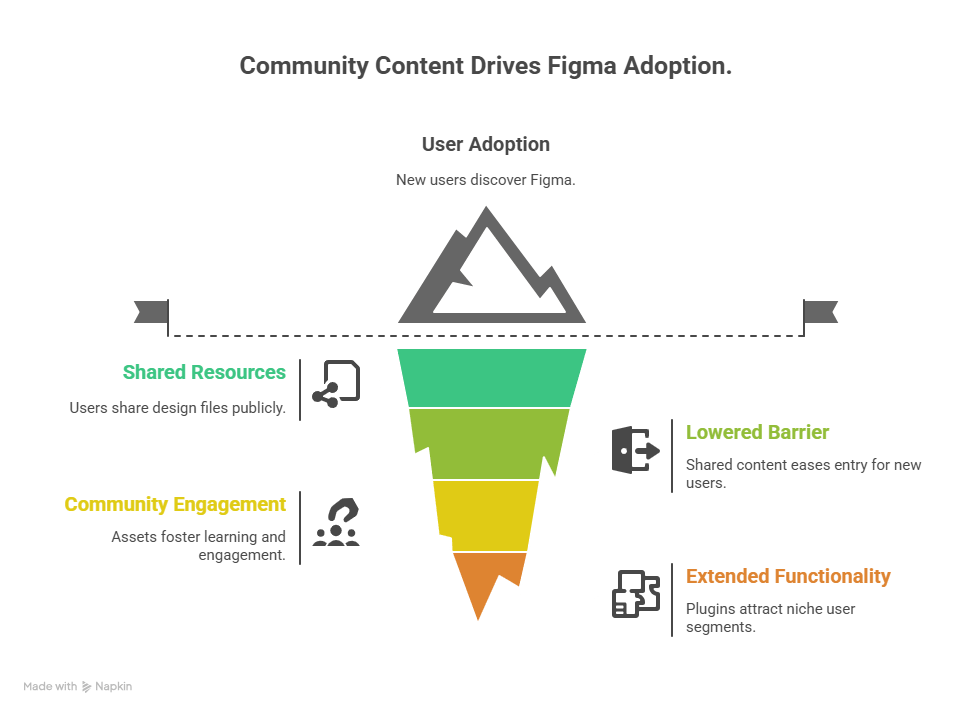
Figma’s Adoption is driven by community content
Figma hosts a vibrant community where users share design files, UI kits, templates, and plugins publicly.
New users discover Figma through these shared resources, which serve as both inspiration and practical tools. This encourages users to try Figma and adopt it as their design platform.
This is genius:
Shared content templates remove the barrier to entry - the mental load and the learning curve of trying Figma - because you’re guaranteed to find a project that fits your use case.
Community assets foster engagement and continuous learning.
Plugins extend functionality, attracting niche user segments.
3. Network Effects: The More Teams Collaborate, the More Value Figma Delivers

Figma’s network effects sequence
As more teams and organizations adopt Figma, the platform becomes a central hub for design collaboration across companies and industries.
This increases switching costs and lock-in, because teams rely on shared files, libraries, and workflows that are hard to replicate elsewhere. In other words, switching to another platform would be time-consuming and expensive, so it would be better to stick with Figma.
Why it works:
Cross-team collaboration enhances productivity.
Shared libraries and design systems standardize workflows.
Integration with other tools (e.g., Slack, Jira) embeds Figma into broader ecosystems across an organisation.
That’s a wrap on Figma, see you in the next one! If you made it this far, reply with a growth loop♾️.
Next week Sunday, we’re diving into the growth of Formula 1 as a brand.
P.S. If you liked this, share it with your friends and colleagues here.